

How to Track Your eBay Sales and Profits, the Easy Way

Don't skip this crucial step

How to Track eBay Sales Reseller

Key Points

  • Tracking your costs, sales, and profits on every transaction is the foundation of any business

  • Free tools like Google Sheets are sufficient for most beginners; eBay also offers built-in analytics

  • Reviewing your sales data over time helps you identify your most profitable categories and eliminate low-margin activity

Most people who start reselling don’t think of themselves as running a business, at least not at first. It’s a side hustle, a way to flip a few items and pocket some extra cash. That framing is fine, but it comes with a blind spot: if you’re not tracking what you spend and what you make, you don’t actually know whether you’re making money. That’s true whether you’re flipping one item a week or fifty. Getting organized is easy, and allows you to get a clear look at all your wins and losses.

This article is part of Resell Calendar’s complete beginner’s guide to reselling

Why Tracking Sales is Important for Resellers

It’s pretty simple. You bought something. You sold it. You made money, or you didn’t. But the details add up fast. There are platform fees to account for, shipping costs, the price of poly mailers and boxes, the occasional return, the item that sat for three months before you dropped the price. If you’re just watching money come in without accounting for everything going out, your mental math on profitability is almost certainly off.

This isn’t a warning to scare you. Most beginner resellers are profitable once they’ve got a handle on sourcing. But “most” isn’t all, and the ones who realize they’ve been bleeding margin on a category they like but that doesn’t actually pay are usually the ones who weren’t keeping records. They find out late.

The other reason to track from day one is less obvious: data compounds. The longer you’ve been recording your sales, the more data you have, and the more clearly you can see patterns, trends, and opportunities. Resellers who have twelve months of tracked sales can make decisions that resellers flying blind simply cannot. More on that in a moment.

Start With a Spreadsheet

You do not need specialized software to get started. A basic Google Sheets spreadsheet is free, works on any device, and is completely sufficient for most resellers in their first year (and beyond).

We built a free template you can use right now. The RC Reseller Profit Tracker includes an Inventory Log with auto-calculated profit, a Monthly Summary tab that updates as you fill in sales, and a platform fee reference guide. Open it and go to File > Make a Copy to save your own editable version. Make sure you check the “How to Use” tab at the bottom for a quick tutorial.

If you don’t have a Google or account or prefer not to use one, you can still download the .xlsx file and use it on any spreadsheet app.

And if you’re a stubborn type that prefers pen and paper or just building your own spreadsheets, your profit tracker should include (at a minimum) the item’s name, what you paid for it, what you sold it for, shipping and platform fees, and the date you sold it.

That’s it. Six or seven columns. If you’re doing this consistently, even a messy spreadsheet will tell you things a clean mental estimate never will.

A few practical tips for keeping it up. Log purchases the day you make them, not when the item sells. If you wait, you’ll forget what you paid or lose the receipt. Keep a running “active inventory” tab separate from a “sold” tab so you can see at a glance what’s still sitting and for how long. And don’t skip the fees column. eBay takes roughly 13% of your final sale price including payment processing. If you’re mentally calculating profit without accounting for that, every number you’re running is too high.

eBay's Built-In Seller Analytics

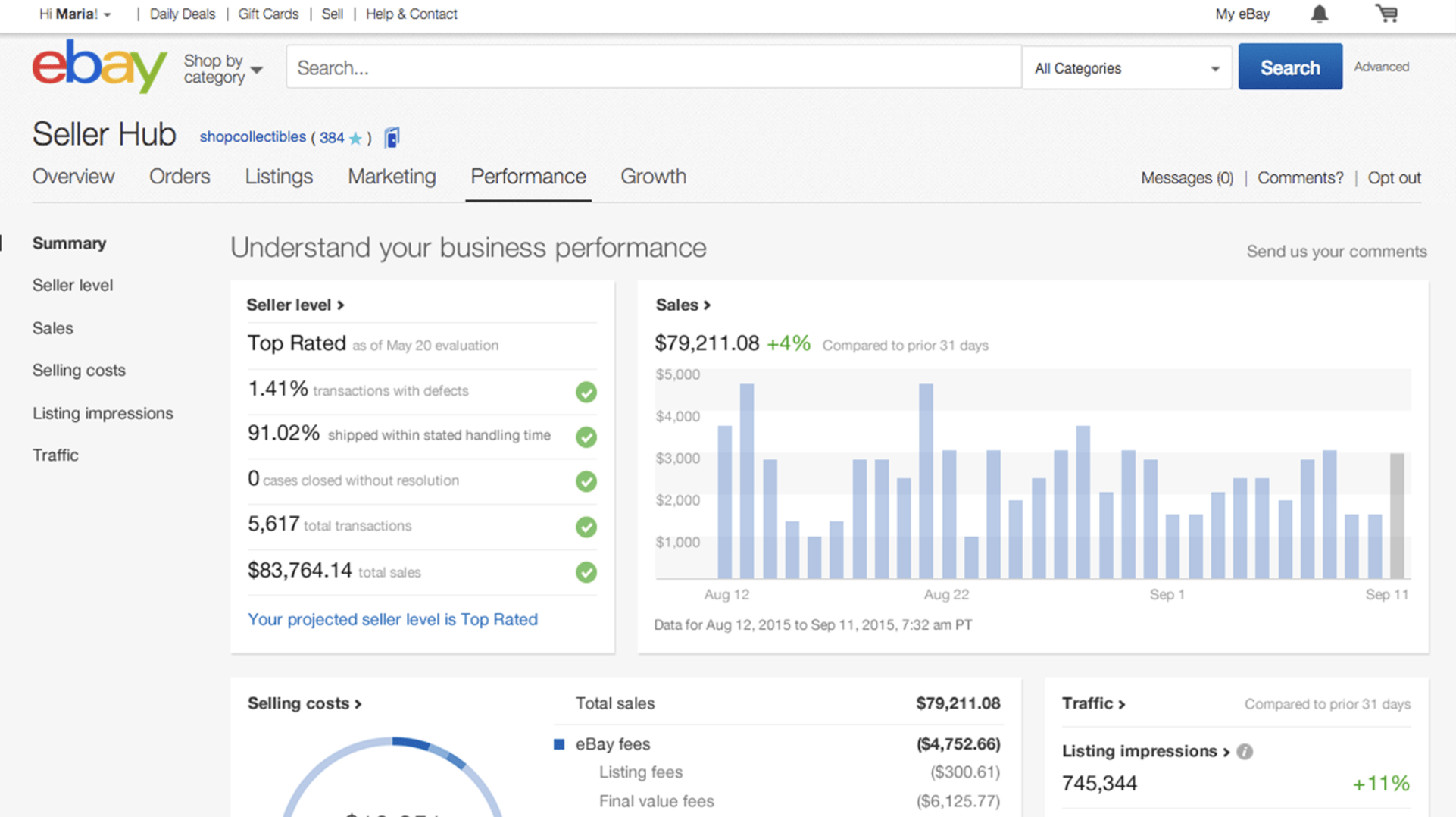
Once you’re moving consistent volume on eBay, the platform’s own tools become genuinely useful. eBay’s Seller Hub is available to all sellers and provides a dashboard covering recent sales, traffic data, and listing performance.

The “Performance” tab within Seller Hub shows your sales totals over time, average sale price, and how your listings are performing in search. The “Research” tab, which is available in a more limited form for free and more fully through eBay’s Terapeak subscription, lets you look up historical sold data on specific products and categories. This is useful both for pricing and for evaluating whether a category is worth pursuing in the first place.

eBay Seller Hub Analytics Reseller

For sellers specifically focused on eBay, these tools reduce the need for a detailed external spreadsheet, though many experienced resellers use both. The spreadsheet gives you full control and customization; eBay’s analytics give you market context you can’t easily replicate on your own.

Other Tools for Tracking Sales and Profit

As your operation grows, dedicated reseller software can save time and reduce errors. A few options worth knowing:

Flyp is a consignment app that also includes tracking features, though it’s primarily aimed at resellers who want to outsource listing. Reseller Assistant and similar apps are built specifically for multi-platform resellers and connect directly to eBay, Poshmark, and Mercari to pull sale data automatically. InventoryLab is more tailored to Amazon sellers but has broad utility for anyone doing high-volume retail arbitrage.

None of these are necessary when you’re starting out. The cost is only justified once manual tracking is genuinely taking more time than the subscription would save. For most resellers, that threshold is somewhere in the range of thirty to fifty transactions per month. Below that, a spreadsheet is almost always the right call.

Analyzing Your eBay Sales Data

Here’s where tracking stops being about record-keeping and starts being about making better decisions.

After a few months of consistent data, you have something most early-stage resellers don’t: a real picture of your business. And that picture is usually more interesting and more uneven than it feels day to day.

Some resellers look at six months of data and discover that one product category is generating the majority of their profit despite representing only a quarter of their sales volume. Others find the opposite: they’ve been spending a lot of energy on a category that feels active and fun but that’s barely breaking even once fees and shipping are factored in. Some discover that their real income comes from a handful of high-ticket items while the bulk of their lower-priced volume is essentially busy work. Others find that flipping inexpensive items en masse is where all their margin actually lives.

None of these outcomes are obvious without the data. Your gut will lie to you. You’ll remember the $400 flip and forget the eight items that sold for $2 of profit each. You’ll think a category is working because it’s moving when the actual margins are thin. Tracking this data in bulk is what allows you to take a step back and analyze your business without bias.

Once you can see these patterns clearly, strategy follows naturally. You focus your sourcing time on what’s actually working. You stop chasing categories that feel promising but consistently underperform. You set a minimum margin threshold and let it guide your buying decisions so you’re not acquiring inventory that you’ll later realize wasn’t worth the shelf space.

This kind of analysis doesn’t require sophisticated software or a finance background. It only needs a clean record of your sales and enough entries to see patterns. Which is exactly what you’ve been building since day one.

That’s the full circle here. The reason to track from the beginning isn’t because you’ll need the data tomorrow. It’s because you’ll need it in six months, or a year, when you’re ready to stop experimenting and start running a deliberate operation. Every sale you log now is a data point that future you will be glad to have.

This article is part of Resell Calendar’s complete beginner’s guide to reselling

Get posts like these in your inbox.

Monthly digest of the best of Resell Calendar.

Related Articles

How to Resell Toys Guide Flipping
How to Resell Toys for a Profit

This is one of the most volatile markets for resellers

eBay Item Not Selling Guide for Resellers
What to Do When Your eBay Listing isn't Selling

Unfortunately, it will happen to every reseller

Beginners Guide to Reselling Flipping 2026
How to Start Reselling in 2026: A Complete Beginner's Guide

From total noob to seasoned pro, we're here to answer all your questions

Money sandwich, metaphor for cook group for resellers
What Is a Cook Group and Do You Need One?

Well, it's not a bunch of chefs hanging out

How to Price eBay Listings Profit
How to Price eBay Listings Without Leaving Money on the Table

Do your research, start high, and milk that FOMO

Start Here

How to Resell Toys Guide Flipping
How to Resell Toys for a Profit

This is one of the most volatile markets for resellers

eBay Item Not Selling Guide for Resellers
What to Do When Your eBay Listing isn't Selling

Unfortunately, it will happen to every reseller

Beginners Guide to Reselling Flipping 2026
How to Start Reselling in 2026: A Complete Beginner's Guide

From total noob to seasoned pro, we're here to answer all your questions

Pounce on resell opportunities before they sell out.

Get the details

How to Resell Toys Guide Flipping
How to Resell Toys for a Profit

This is one of the most volatile markets for resellers

eBay Item Not Selling Guide for Resellers
What to Do When Your eBay Listing isn't Selling

Unfortunately, it will happen to every reseller

Beginners Guide to Reselling Flipping 2026
How to Start Reselling in 2026: A Complete Beginner's Guide

From total noob to seasoned pro, we're here to answer all your questions

Subscribe to Newsletter

A monthly digest of the best of Resell Calendar.