
How to Set Up an eBay Seller Account

Because you can't make a sale without one

Man and woman setting up an eBay seller account

Key Points

  • Creating an eBay seller account is free and takes about 10 minutes to complete

  • New seller accounts come with limits on how many items you can list until you build a track record

  • Payouts are deposited directly to your bank account, typically within two business days of a sale

If you’re just getting into reselling, eBay is where you start. It has the largest buyer pool of any resale platform, the most flexible listing format, and it works for almost every category you could want to sell. Setting up a seller account is straightforward, but there are a few things worth doing right from the beginning so you’re not cleaning up problems later. Here’s everything you need to know.

Creating an eBay Account

Head to eBay and click “Register” in the top left corner. You’ll be asked to choose between a personal account and a business account.

If you’re just starting out and selling casually, a personal account is fine. If you’re planning to run this as a real operation, a business account unlocks some additional tools and is the cleaner choice for tax purposes. You can always convert later, so you might as well start with the simpler personal account setup for now.

eBay Seller Accounts: Business Vs. Professional

  • Personal accounts are intended for casual sellers listing a small amount of items

  • Business accounts are for dedicated sellers exclusively selling items for a profit

  • If you intend to buy AND sell on eBay in high volumes, setting up a separate business account is a good idea

  • Business accounts start at $5/monthly, personal accounts are free

Fill in your name, email address, and a password. eBay will send a confirmation email to verify your address. Click the link, and your account is live.

Setting Up eBay Payments

Before you can sell anything, you need to connect a bank account for payouts. eBay uses its own managed payments system, which means they handle the full transaction and deposit your earnings directly.

Go to “Seller Hub” from the top navigation, then follow the prompts under “Payments.” You’ll need to provide your bank account number and routing number. eBay may also ask you to verify your identity with a government-issued ID, especially if you’re setting up a business account. This is standard and usually clears within a day or two.

Payouts are issued on a regular schedule, typically one to two business days after a buyer confirms receipt. You can also request a payout manually once your balance crosses a certain threshold.

Understanding eBay Seller Limits

This is something a lot of new sellers don’t know going in: eBay restricts how much you can sell until you’ve established a history on the platform. When your account is brand new, you may only be able to list a handful of items per month and sell up to a few hundred dollars in total.

These limits exist to reduce fraud and protect buyers. They’re not a big deal if you know about them ahead of time. The limits go up automatically as you complete sales and maintain good feedback. You can also call eBay’s seller support line and request a limit increase after you’ve made some initial sales, and they’ll often grant it.

The faster you move through your early sales, the faster these limits expand. Start with whatever you have on hand: old games, clothes, electronics, anything with resale value. Getting your first 10 to 20 completed transactions matters more than the margin on those early flips.

How to Increase eBay Seller Limits

  • List and sell items. Even if your margins are slim, the feedback is worth it

  • Respond to feedback quickly and resolve issues. Prove you are trustworthy

  • Don’t try to game the system. Be patient and keep at it

  • eBay automatically reviews your limit on a monthly basis. You can also manually request an increase

eBay Listing Basics

Once your account and payments are set up, creating a listing is simple. From the Seller Hub, click “Create listing” and start with the item title. We’ve published a full guide to making a great eBay listing right here.

eBay’s search algorithm is keyword-heavy. Your title is the most important part of your listing. Include the brand, the exact model name or number, the condition, and any other identifying details buyers might search for. Don’t waste characters on adjectives like “nice” or “great condition.” Pack in the specifics instead.

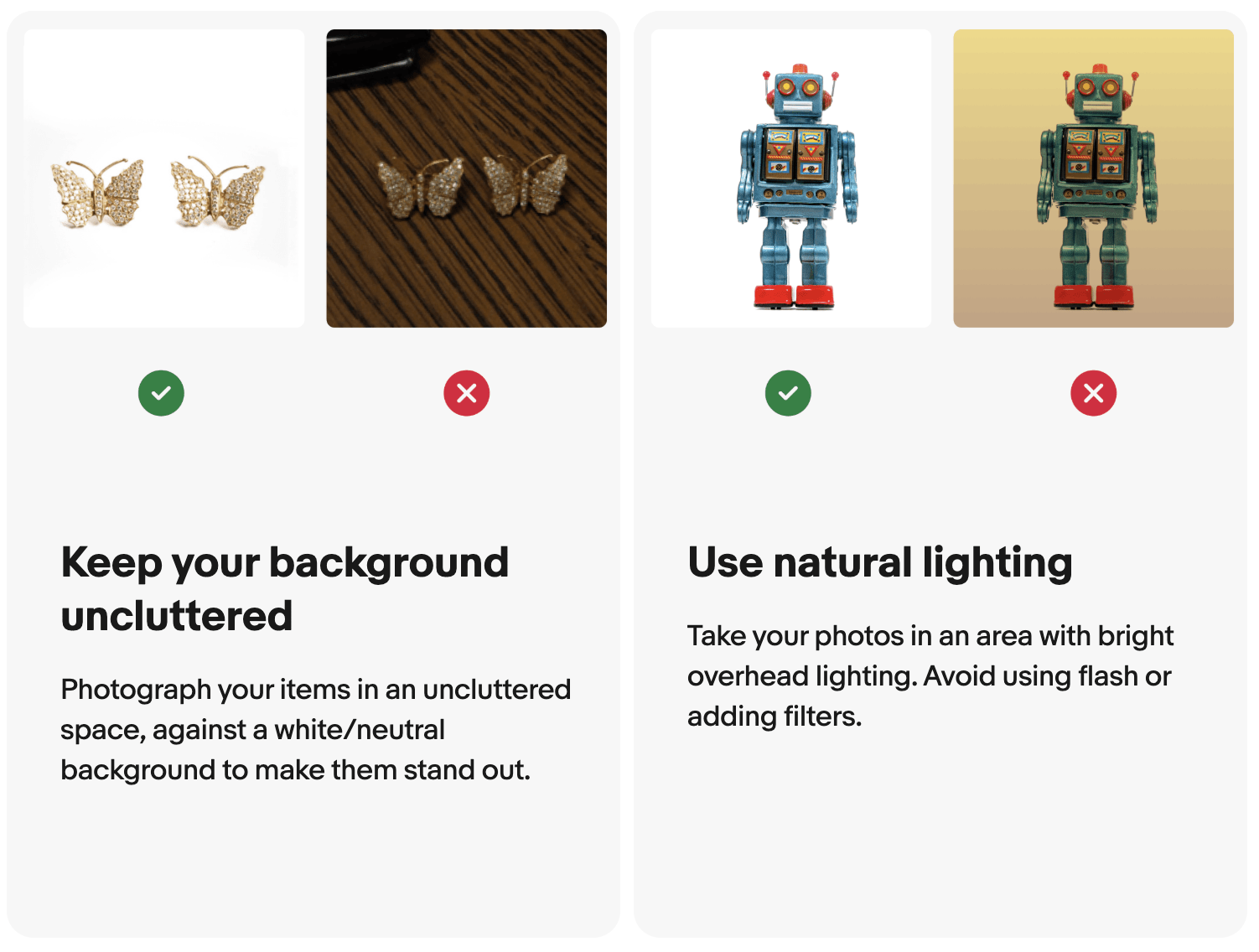
Photos matter a lot. eBay allows up to 24 photos per listing for free. Use all the space you need. Shoot in good natural light, capture every angle, and photograph any flaws honestly. Buyers who feel like they got an accurate picture of what they were buying are less likely to open disputes.

Comparison image of good and bad eBay photos

For pricing, always check eBay’s sold listings before you set a price. Not active listings, which can be wishful thinking. Sold listings tell you what buyers actually paid. Filter by “Sold” in the left sidebar of any search results page, and price from there.

There’s a lot more to writing a strong listing than the basics covered here. For a full breakdown of the best practices for a making a listing, check out our guide to SEO on eBay here.

How to Setup Shipping on eBay

You’ll need to decide how you’re handling shipping before your first sale. eBay offers calculated shipping, which charges buyers based on their location and the package weight you specify, or flat-rate shipping, where you set a fixed amount. For most resellers starting out, calculated shipping is the safer option because it protects your margin no matter where the buyer is located.

Invest in a basic postal scale before you start listing. Inaccurate weights are one of the most common ways new sellers eat into their profit on early sales. A decent scale runs around $15 to $20 and pays for itself immediately.

eBay’s shipping integration lets you print labels directly from the platform at discounted rates through USPS, UPS, and FedEx. Use these. They’re cheaper than buying postage at the post office and the tracking integrates automatically with your order.

Shipping is one of the areas where new resellers lose margin most easily. For a full rundown on packaging, carrier selection, and how to avoid the most common mistakes, read our eBay shipping guide.

Building Your eBay Seller Reputation

Here’s where a lot of new sellers underestimate how important the next few weeks are. eBay is a trust-based marketplace. Buyers can see your feedback score before they decide to buy from you, and a blank or low-feedback profile makes people hesitant.

Your first priority after setup is grinding out early sales to build that reputation, even if the margins are modest. Sell things quickly. Ship fast. Communicate clearly if a buyer reaches out. Every completed transaction with positive feedback makes you a more credible seller and opens up your listing limits.

For a full breakdown of how to build your eBay feedback score efficiently, read our comprehensive guide: How to Build Your eBay Feedback Score as a Reseller.

eBay Seller Account Best Practices

Pick a username that’s neutral and professional. Something like “quickship_resells” works fine. If you’re going to focus on a specific category of item like LEGOs or vinyl, having your account name reflect this is a good idea. Avoid unprofessional, immature, or spammy names. Remember, your username shows up on every listing you post.

Enable two-factor authentication on your account as soon as you’re set up. eBay accounts get targeted by hackers because they have payment information attached. Two-factor takes about two minutes to enable and eliminates most of the risk.

Finally, keep your contact information current. eBay will send important notices about your listings, payment issues, and policy updates to the email on your account. Staying on top of those keeps small problems from becoming big ones.

Get posts like these in your inbox.

Monthly digest of the best of Resell Calendar.

Related Articles

Reseller holding cash
How Much Money Can You Make Reselling?

It depends on what you're willing to put in

Reseller shipping a package for an eBay sale
A Quick Guide to eBay Shipping for New Sellers

Take pictures, pack and seal well, and ship promptly

Best Items to Flip Beginner Reseller
The Best Items for Beginner Resellers to Flip

Start small and record easy profits first

woman holding phone and credit card in front of laptop
How to Write a Great eBay Listing

A little SEO knowledge goes a long way

Presell Guide eBay Reseller Policies
The Complete Guide to Preselling: When, Why, and How

For resellers, putting up presale listings can circumvent risk and lock in early profits

Is Sneaker Reselling Dead in 2025? We Dont Think So
Sneaker Reselling has Changed in 2025, But it's Not Dead

Margins are down across the board, but volume is up. Flipping sneakers is still plenty profitable

2025 Thrift Guide for Resellers
Here's Why 2025 is the Best Year to Get Into Thrifting

We're seeing some of the biggest profits since 2009. If you're not thrifting, you're leaving money on the table

Start Here

Man and woman setting up an eBay seller account
How to Set Up an eBay Seller Account

Because you can't make a sale without one

Reseller holding cash
How Much Money Can You Make Reselling?

It depends on what you're willing to put in

Pounce on resell opportunities before they sell out.

Get the details

Man and woman setting up an eBay seller account
How to Set Up an eBay Seller Account

Because you can't make a sale without one

Reseller holding cash
How Much Money Can You Make Reselling?

It depends on what you're willing to put in

Reseller shipping a package for an eBay sale
A Quick Guide to eBay Shipping for New Sellers

Take pictures, pack and seal well, and ship promptly

Subscribe to Newsletter

A monthly digest of the best of Resell Calendar.